Find out if it's actually working.
NextFit puts your steps and your weigh-ins on one timeline, smooths out the day-to-day noise, and tells you plainly what the data supports — without ever showing your weight to anyone.
Free, and built for the Philippines first: step challenges for your barkada or your whole office, in English or Filipino on the phone. Reads from Apple Health or Health Connect — any smart scale or watch that writes there just works.
Daily steps below, your body-fat trend above, one shared timeline.
The app
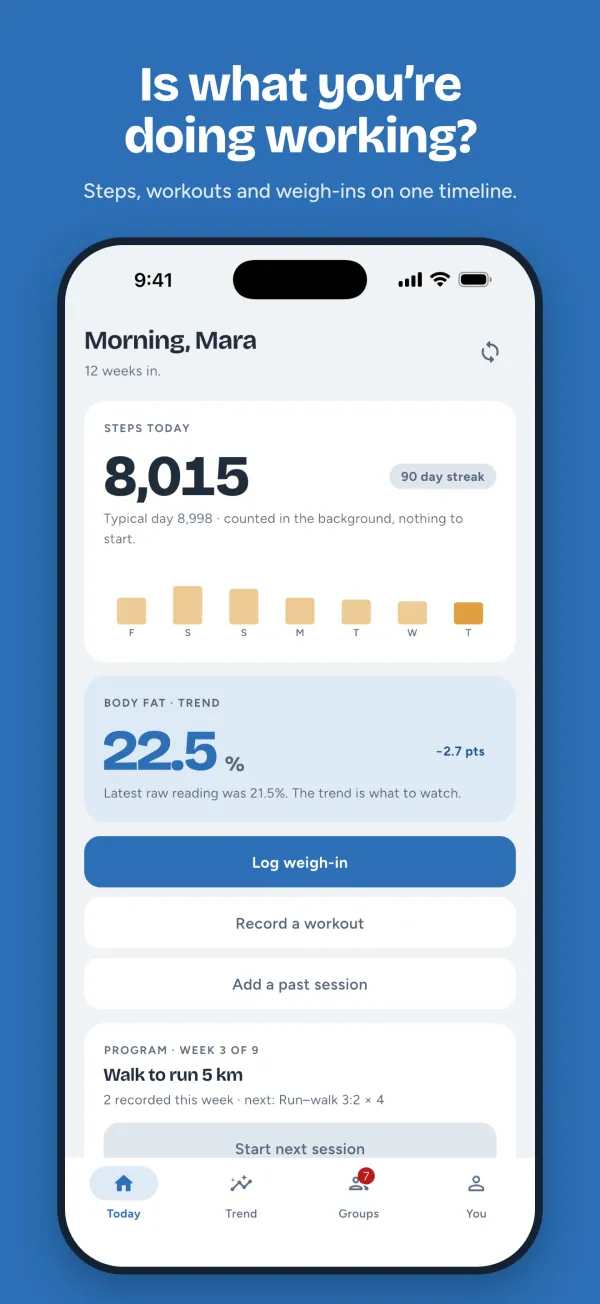
Today: your steps, and the trend — not the day's reading. 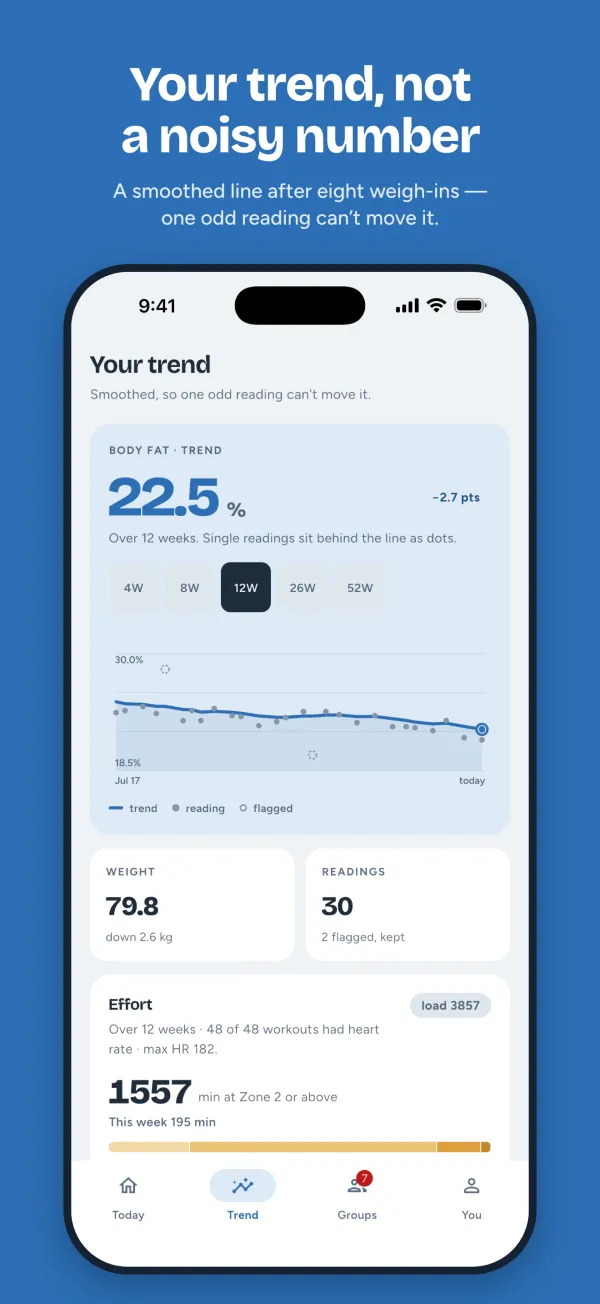
A smoothed line after eight weigh-ins; one odd reading can't move it. 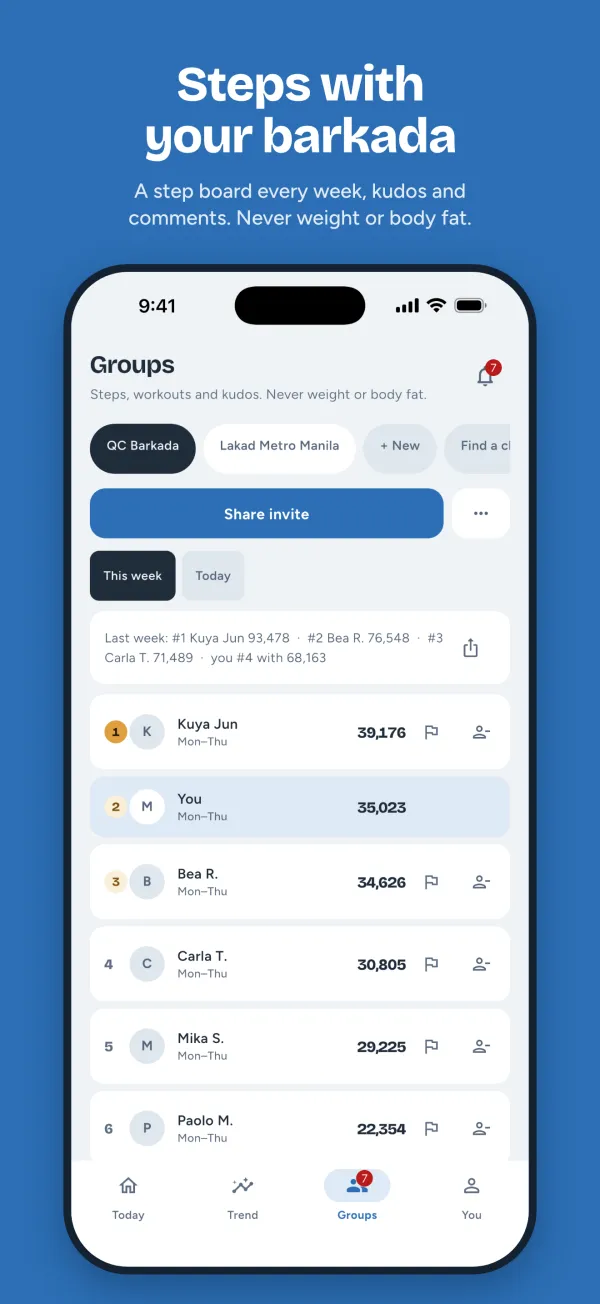
Steps with your barkada: names and steps, never weight or body fat. 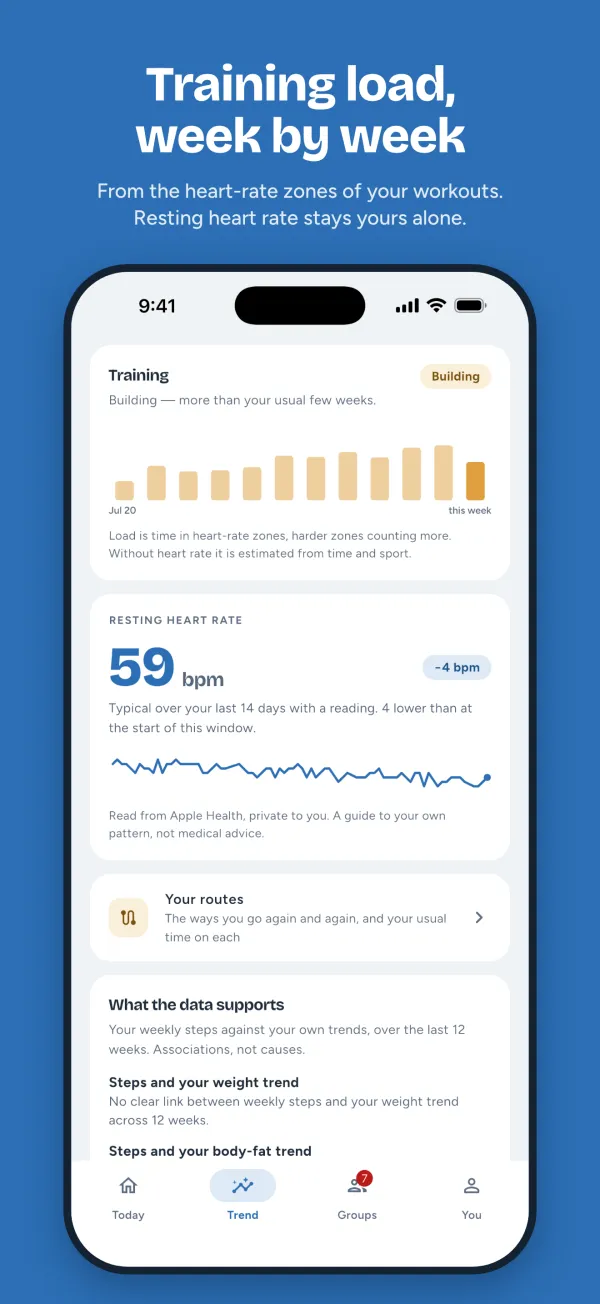
Training load, week by week, from your workouts.
One timeline
What you put in — steps, walks, runs, rides — under what comes out, so you can see the two move together, or not.
An honest trend
No line until there are eight readings. Odd weigh-ins are flagged and explained, not hidden. It reports the middle of your days and never scores them.
Private by design
Weight and body fat are never shown to anyone, in any group, ever. It isn't a setting you could get wrong — the server can't send them.
For your workouts, too
Walks, runs, hikes, rides and more — 23 sports, recorded on the phone, synced from a watch, or imported. Everything below is free.
Training status
Easing off, steady, building — how your last week of workouts compares with your usual few, from heart-rate zones or, without a watch, each workout's length.
Programs
Walk 30 (four weeks) and Walk to run 5 km (nine weeks, at your own pace) are free: three sessions a week. Each week says what you recorded and what's next.
Intervals with spoken cues
Walk–run, tempo and hill sessions on the phone: it speaks each step and, with a heart-rate strap, says when to ease off or pick it up.
FIT and GPX in, GPX out
Bring a workout in from a watch or another app as a .fit or .gpx file, on the phone or the web, or take any of your routes out again as GPX. Your maps stay yours.
Resting heart rate
Your typical resting heart rate, from a watch or ring through Health, after a week of readings. Private like your weight — and not medical advice.
Out on the map
Share where you are with the people you choose, plan a route, find routes near here and the streets people use, and see your times on segments — free. What's public is only ever what you made public.
Live location, free
Before a walk, run or ride, send a private link to the people you choose: they see where you are while you record, and it ends when you finish. Free for everyone — never your heart rate or anything about your body.
Plan a route
Tap points on the map to plan a walk or a ride, then follow it on the phone while you record. Five saved plans are free.
Routes near here
Public walks, runs and rides on the map, from people who chose to share them, each with its ends trimmed — copy one as your own plan.
A heatmap of public workouts
Where people go, from public workouts only: a street shows only once three different people have passed it.
Segments and their boards
Make a segment from a stretch of your own public workout. Its boards rank time alone — a public one, and one in each of your groups — and every time can be reported.
Public only if you choose
Public sharing is off until you turn it on, for people 18 and over. A public workout shows its date, never the time of day, and its map with both ends trimmed and your privacy zones cut out — never heart rate, weight or body fat.
Badges, journeys and active weeks
Something to walk toward, on your own or with your group — all of it free, and all of it steps and workouts.
Badges
Badges for your steps and workouts — what you earned and how far along the next one is, never a ranking.
Philippine journeys
Intramuros to Tagaytay, Banaue to Sagada, Manila to Baguio: journeys walked with your steps, one after another.
Active weeks
Your active weeks in a row, with rest days built in — a streak for steps, never for weigh-ins.
Shared goals
A group picks a step total and walks it together, and every Monday brings last week's recap. Steps only.
Steps in the background
Your steps reach Today and your groups while NextFit is closed, read from Apple Health or Health Connect.
Walk together. Weigh in alone.
Groups compare steps — a board for today, a challenge every week, shared goals walked together and three active days each, with a pacer so a new group is never a board of one. Write to each other in the group's posts and reply, plan a walk and see who's coming, clap for a workout, leave a comment, see the route with its start and end trimmed off. Steps typed into NextFit, and unusually high days, are shown but never ranked.
- Connect HealthApple Health or Health Connect. NextFit reads, and never writes.
- Weigh in as usualAny scale that syncs to Health, or type it in.
- Watch the trendAfter eight readings, a line you can trust — with your steps on the same timeline.
Together, and on your home screen
Posts, replies and planned walks, badges and people to walk with in your groups, a challenge for the month, and your steps a glance away — free, and all of it steps and workouts.
Group posts
A private group's own posts, replies under them and four reactions from one icon set. Only that group reads them, and every post can be reported.
Planned walks
Pick a time and type where to meet — never your location. Your group answers going or maybe, those going get a reminder, and a walk can repeat every week or go into your calendar.
Together, against last week
Your group's steps this week next to its own last week: one total for everyone, nobody ranked.
Badges in the feed
Your group sees the badges and journeys you finish — a badge's name and when, never a number behind it. Switch it off any time.
Three active days each
A week where everyone gets three active days, each near their own typical day: one count for the group, nobody ranked.
People you walk with
Invite people from your small groups. NextFit never reads your contacts, and anyone can turn suggestions off.
A monthly challenge
The month's community challenge has its own target, 5,000 steps a day of the month, and “Keep me in each month” puts you in the next one as it opens.
Journeys together
A group walks a Philippine journey on everyone's steps, sized to its own pace: about how many days it takes, each stop told to the group, and a finish card once it's walked.
Widget and Live Activity
Today's steps beside your typical day on your home screen, and on iPhone a Live Activity on the lock screen while you record.
For workplaces
Run step challenges for a team or a whole company. The organiser's dashboard shows weekly totals for everyone together, counted from the day each person joined — never one person's numbers, nothing at all for a week with fewer than five people walking, and never weight or body fat. Finished weeks are frozen, so they don't shift as people come and go. Team groups work like any NextFit group: the people who join one see each other's steps and, unless someone switches them off, their workouts and maps with the ends removed — never weight or body fat.
Free, with an optional Plus
Everything above is free for people; workplace plans are arranged with us. Plus — US$2.49 a month or US$19.99 a year, about ₱149 a month in the Philippines (the store shows your exact price), bought in the app — adds 26- and 52-week windows for your trend and training, a deeper look at how your busier and quieter weeks line up with your trend, fitness and fatigue, likely race times from your own best efforts, a VO2max estimate from your own runs, a suggestion for today, six more programs (a half marathon and a marathon among them), a week's plan counted back from your race day, an easier session on a heavy week and paces from your race times, your routes and your history on each segment, a heatmap on a map of where you go most (yours alone), up to 200 planned routes with each one's points in a GPX file, a private monthly review with what moved this month and a note each Monday on your week — notes on your own workouts — your year in review and a year of challenge history.